Department of Natural Sciences
Checklist for first semester BSc students Natural Sciences
⇒ Step 1: Self-registration on MIA
To find out your login details for central university services, you must first complete a self-registration on MIA. You will need your student ID card for this.
During the process, you will be asked to assign a password. You will also be given your login ID (the so-called department code - for example mmuste1s). With your department code and MIA password, you will then have access to MIA, your OWA university email address and other university services.
Be sure to make a note of your department code and MIA password during the process!
Link for self-registration on MIA: https://mia.h-brs.de/sspr/public/activate
(If you would like to reset your password via MIA if you have forgotten it, you can do this via the Identity & Access Management MIA).
⇒ Step 2: Set up/retrieve e-mail account etc. via the central mail server for students
Upon enrolment, all students at the university are given email access.
Important: In order to gain access to their e-mail account, new students at H-BRS must first complete a self-registration on MIA (see step 1).
Login: Department code (mmuste5s)+ self-assigned password via MIA
Link to the mail server: https://owa.stud.h-brs.de/
You can be reached at the following e-mail address: vorname.name@smail.bcw.h-brs.de
⇒ Step 3: Access LEA (central teaching and learning platform of the university)
Login with: Department code (mmuste5s) + MIA password
The platform gives you access to teaching materials for your degree programme (e.g. important information for first semester students, current information, lecturers' slide sets, exercise sheets).
Further information on LEA: https://www.h-brs.de/en/bib/lea-im-studium
or link to the learning platform: https://lea.h-brs.de/
⇒ Step 4: Participation in the LEA course "Everything for new students- BSc Bio International students "
Please register for the LEA course of your degree programme to receive all the important information - especially about the introductory and orientation weeks - to ensure a good start to your studies!
- BSc Applied Biology (BSc Bio) germanspeaking:
https://lea.hochschule-bonn-rhein-sieg.de/goto.php?target=crs_1724007&c… - BSc Applied Biology (BSc Bio) international:
https://lea.hochschule-bonn-rhein-sieg.de/goto.php?target=crs_1726428&c… - BSc Naturwissenschaftliche Forensik (BSc NatFor):
https://lea.hochschule-bonn-rhein-sieg.de/goto.php?target=crs_1713957&c… - BSc Nachhaltige Chemie und Materialien (BSc NCM):
https://lea.hochschule-bonn-rhein-sieg.de/goto.php?target=crs_1586446&c…
⇒ Step 5: Buying a lab coat
Please obtain (at least) one long lab coat (ending at the knees or calves) with long sleeves and with a cotton content in the fabric of at least 35% (even better 100% cotton), colour: white, by the start of the study (15.09.2025).
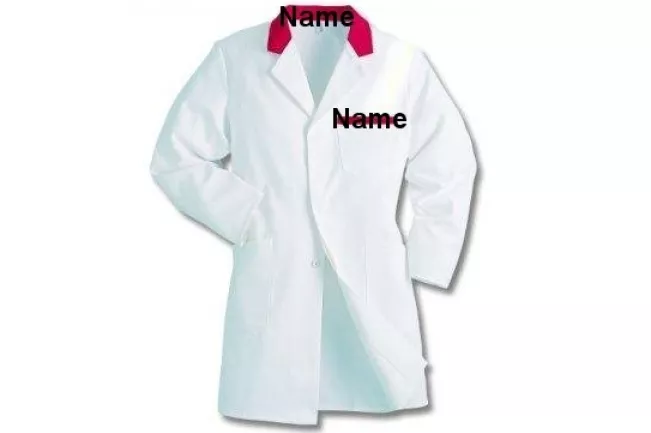
Weitere Spezifikationen zum Laborkittel für alle Biologiestudierende/further specifications for the lab coat for all biology students:
Working in biological labs: the lab coat will stay in the lab during the complete course. Afterwards it has to be autoclaved, washed and ironed. Whereby the autoclavation is done at the university, washing and ironing is your part at home!
So, you may need two lab coats when having other courses, too!
The lab coat has to be labelled with your full last name (not more!) inside at the collar and additionally on the pocket on the left side of the coat, using a water proof pen. On the picture the places are marked in red.
Avoid any other drawings and writings on the lab coat as during autoclavation bleeding (to other lab coats) is possible.
⇒ Step 6: Apply for access to Student Information System SIS
Important note: To get your SIS password, you first have to click on "Apply for Access ?" on the SIS homepage. An initial password will then be sent to your student e-mail inbox.
Access: department code (mmuste5s) + requested SIS password
Link to SIS-login or apply for access: https://sis.h-brs.de/pp/sis/en?UserAcc=Gast&DokID=DiasSWeb&SID=&Action=Login
⇒ Step 7: Library Access
Access: Department code (mmuste5s) + MIA password
Description: Centralised search in the library's holdings (printed and digital media).
Note: To borrow media from the library, you also need a 4-digit PIN, which you can assign yourself in Bib-Discover.
To use the digital services, the library's remote access (proxy setting) must also be set up.
The library or the e-learning team can answer any questions you may have.
If you have any technical problems during your studies, please contact the departmental system administrator Olaf Stock or the ServicePoint of the Department of Natural Sciences.
Contact point
Service Point Department Natural Sciences
Campus
Rheinbach
Room
G011
Opening hours
Monday - Friday for the lecture period: 8 am - 4 pm
Monday - Friday for the lecture-free period: 9 am - 2 pm